The Personal AI Assistant Playbook
The Personal AI Assistant Playbook
Couldn't load pickup availability
What This Guide Is
A plain-English, start-to-finish walkthrough for building your own AI assistant — one you talk to out loud, that knows your calendar and your inbox, that you can reach from your phone, and that keeps running after you close the laptop.
Twenty chapters, two complete routes. Path A is the one where you build nothing: you sign in, connect a few things, and have the whole experience by bedtime. Path B is the one where the assistant runs on a computer you own, with a model you chose — more work, and the only version where your conversations stay yours. Chapter 2 tells you which one you actually want, and you can do both.
No coding. Every terminal command is printed in full. Path A never needs one at all.
What's Inside
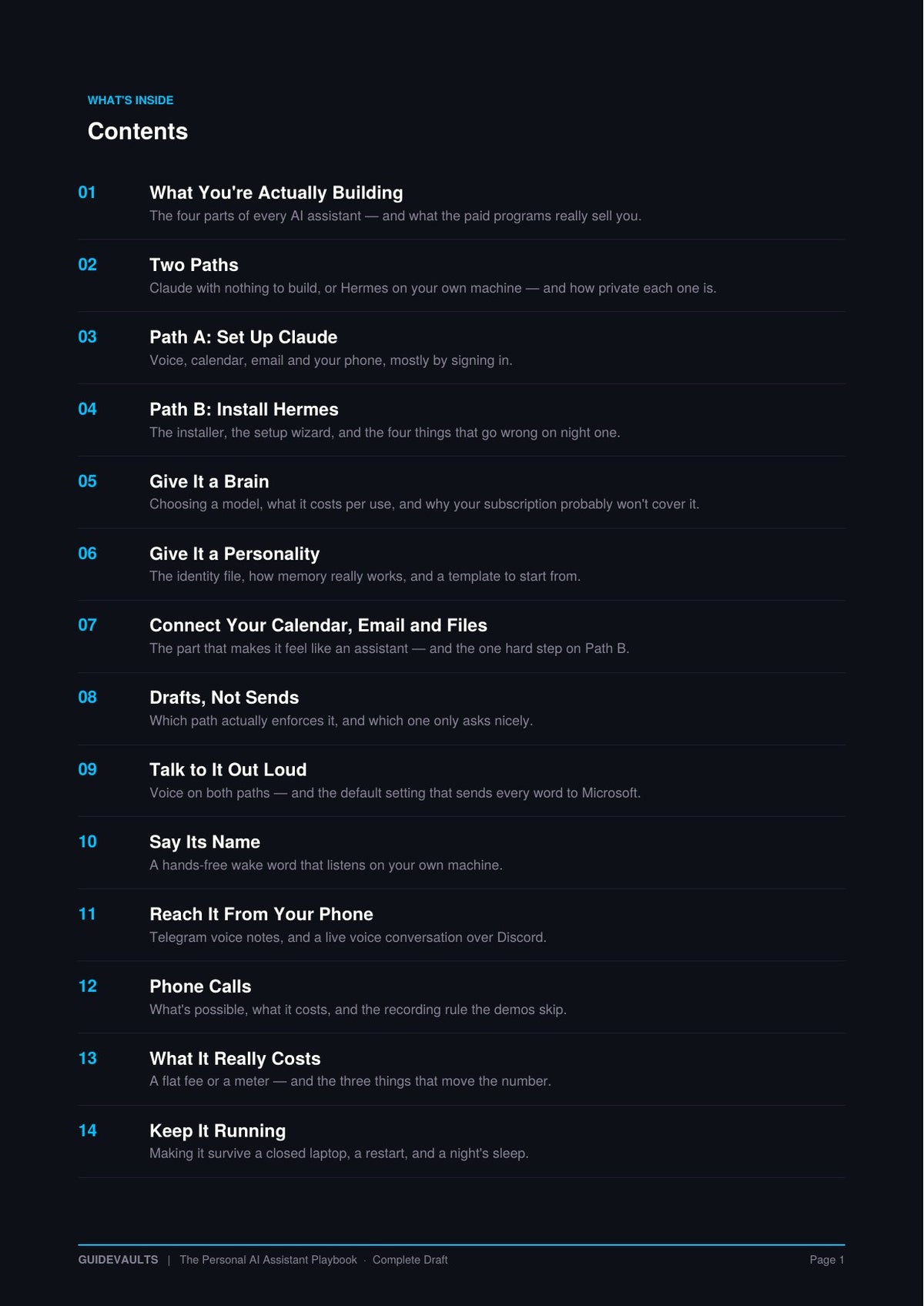
01 — 04 · Getting it running
- The four parts every AI assistant is made of — and what the paid programs are actually selling you
- Two paths compared honestly, including how private each one really is
- Path A: voice, calendar, email and your phone, mostly by signing in
- Path B: the installer, the setup wizard, and the four things that go wrong on night one
05 — 08 · Making it yours
- Choosing a brain: which model, what it costs per use, and why your subscription probably doesn't cover it
- The identity file, how its memory actually works, and a template to start from
- Connecting your calendar, email and files — including the one genuinely hard step on Path B
- Drafts, not sends: which path enforces that, and which one only asks the model nicely
09 — 12 · Talking to it
- Voice on both paths — plus the default setting that quietly sends the assistant's spoken replies to Microsoft's cloud
- A hands-free wake word that listens on your own machine. Say its name, it answers
- Reach it from your phone: Telegram voice notes, and a live back-and-forth voice conversation over Discord — free, from anywhere
- Phone calls: what's genuinely possible, what a real number costs per minute, and the recording rule the demo videos skip
13 — 17 · Cost, uptime and where it lives
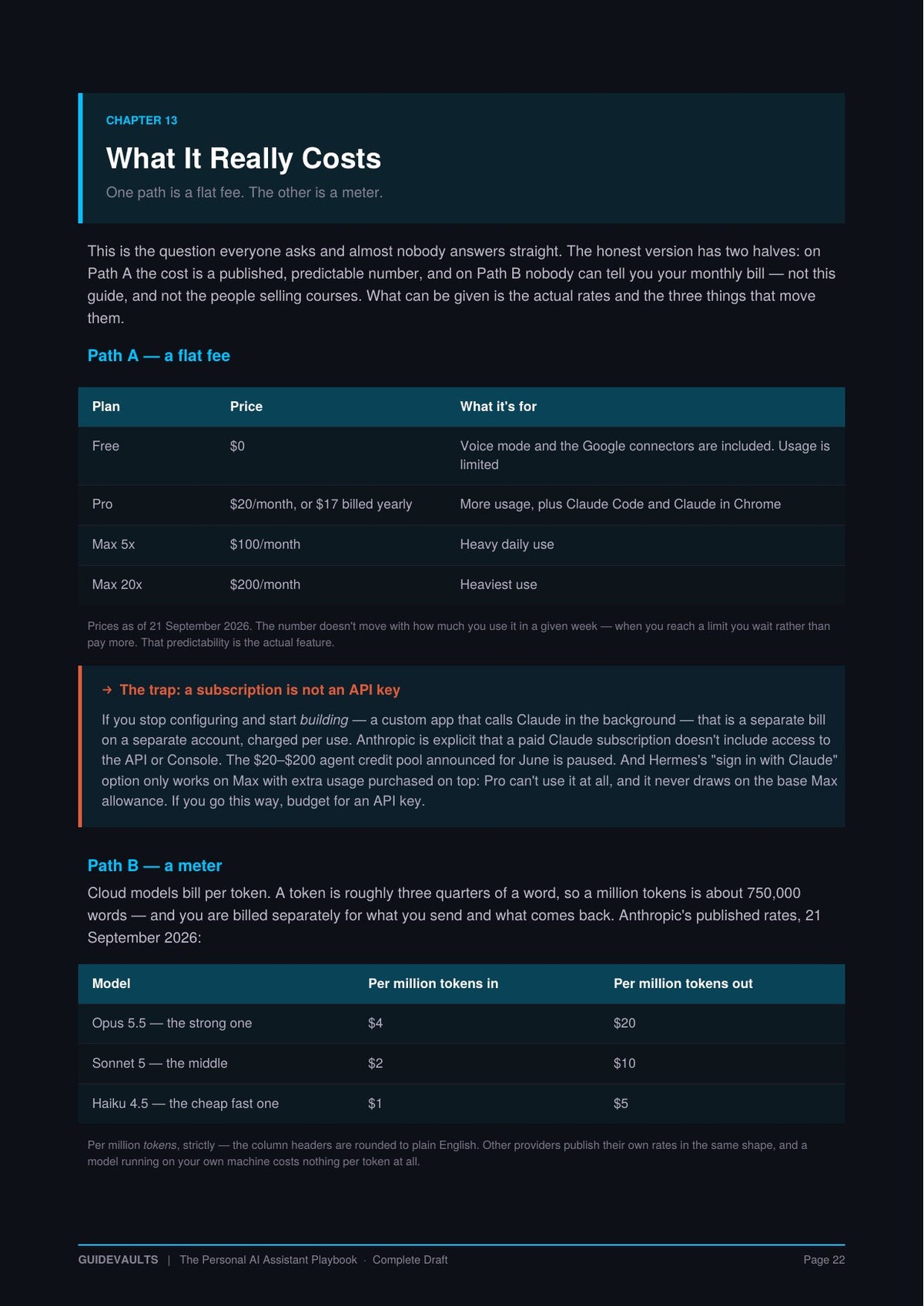
- What it really costs — the published rates for both paths, the three levers that move your bill, and why nobody can honestly quote you a monthly figure
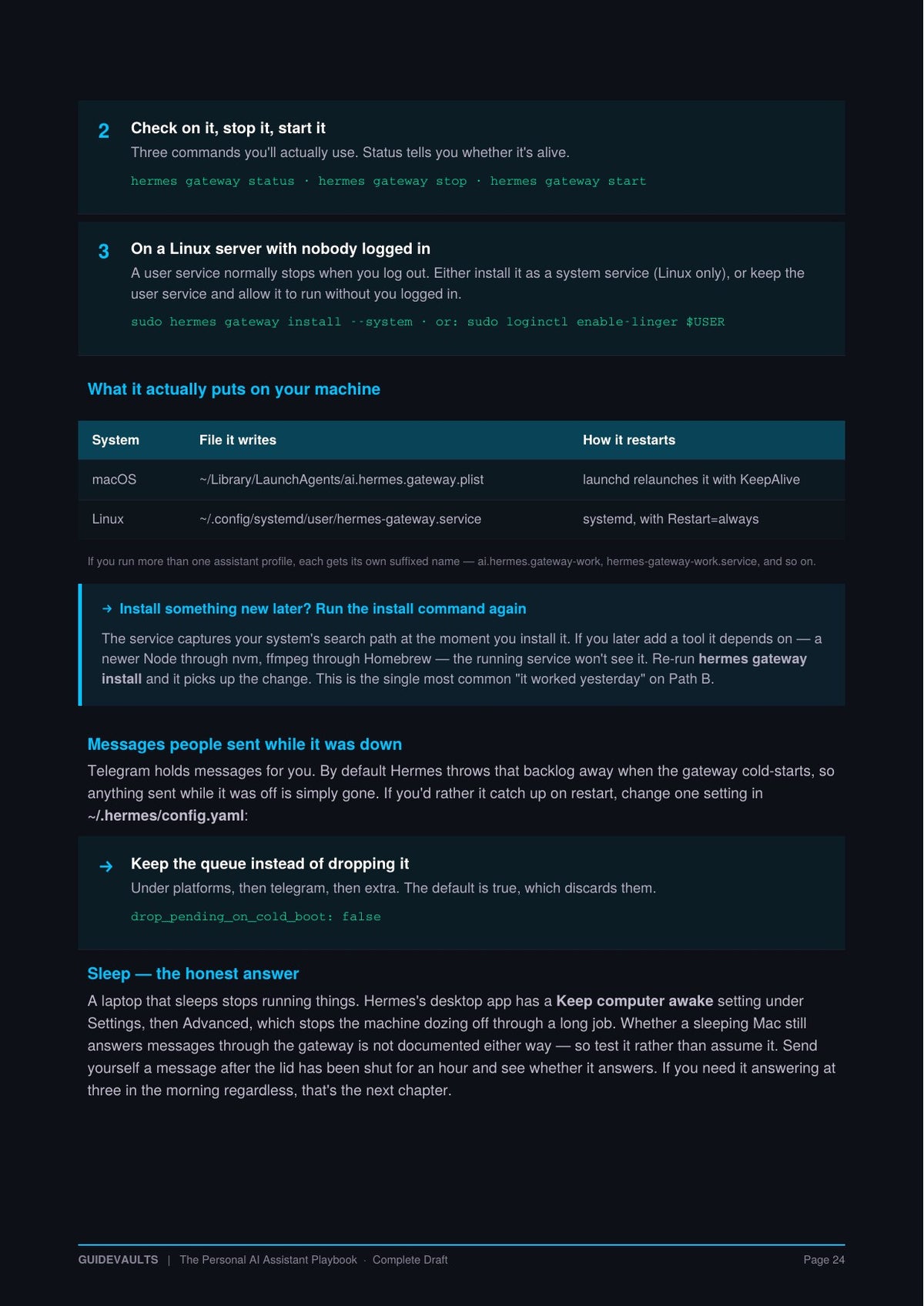
- Keeping it alive through a closed laptop, a restart and a night's sleep — with the exact service commands and files
- Your computer, a rented server, or both: dated prices, real memory requirements, and why a cheap server cannot run a private model no matter what you've been told
- Locking it down — including the official install command that exposes your assistant to the internet and slips past your firewall
- The hybrid build: always-on in the cloud, with the thinking still happening on your hardware at home
18 — 20 · Where it goes from here
- Three agents, not nineteen — why the org chart of AI employees is a job list in costume
- The cheat sheet: every command, file and setting on one page
- A plan for tonight, this week and this month — starting with thirty minutes
It Doesn't Go Stale
Every guide about AI is out of date the week it's written. Prices move, features ship, defaults change. Most sellers pretend otherwise and quietly leave you holding a document from last year.
This one gets corrected, and you get the corrections free through September 2027. When something material changes — a price, a command, a capability — the guide is updated and the new version appears at your original download link. No repurchase, no upgrade tier, and no re-reading the whole guide to find the difference: page 2 is a dated changelog listing exactly what moved and which chapter it's in.
Anthropic launched a cheaper model on 22 September 2026 — the day this guide was finished. Two pricing tables were wrong within hours. They were corrected before release. That's the standard.
14-day guarantee. If this guide isn't what you expected, email support@guidevaults.com within 14 days and we'll refund you in full — no forms, no hoops.
Who This Is For
For people who want the assistant from the demos and don't want to learn to code to get it. If you've priced up a coaching program for this and hesitated, if you've never opened a terminal, or if you've started caring where your emails and conversations actually end up — this is written for you, at that level, the whole way through.
It is not a hype document. Where something is new, still rolling out, or has an open bug, it says so. Where a number can't be sourced, it doesn't get printed — including the monthly cost figure everyone else seems happy to make up.
Please read before purchasing. This is an informational guide to setting up personal AI software, for educational purposes. It is not legal, financial or professional advice; the sections covering phone calls, recording and disclosure are general information about a fast-moving area of mostly US law and are not a substitute for advice from a qualified lawyer. All prices, plans, model names and features are a snapshot taken in September 2026 and this space changes monthly — verify current pricing before spending anything, and set a spending cap on any usage-billed account. Updates through September 2027 are delivered to your original download link. Software named in this guide is made by third parties and is not affiliated with GuideVaults. You are responsible for how your assistant is used, including any calls it places and any data you give it access to. 14-day guarantee: email support@guidevaults.com within 14 days for a full refund. Questions welcome at the same address.